
Highlight cell background conditionally in oracle apex report
It’s a very common requirement to highlight cell background based on other columns value in classic or interactive report.
In oracle apex we can achieve this by adding HTML expression in cell attributes.
Before that we have to chnage our sql query a bit.
h.invoice_status,
case when upper(h.invoice_status) = ‘UNPAID’ then ‘yellow’
when upper(h.invoice_status) = ‘CANCEL’ then ‘red’
when upper(h.invoice_status) = ‘PARTIAL’ then ‘orange’
else ‘green’
end as color_code,
Here i am going to change background color of my column “Invoice Status” based on it’s value.
To acheive this navigate to your
Interactive Report -> INVOICE_STATUS(Change according to your column) -> Column Formatting
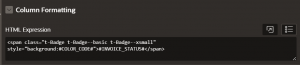
Here add HTML expression to change background of cell colour.
<span class=”t-Badge t-Badge–basic t-Badge–xsmall” style=”background:#COLOR_CODE#”>#INVOICE_STATUS#</span>
Now refresh the page to see the changes.
Thank you.


